
Cleva
Redesigning a Modern Fintech Experience
Cleva helps African Freelancers receive, manage and spend international payments. I explored how its mobile and web experience could be clearer, more consistent and easier to navigate without fundamentally changing the product's existing workflows.
The redesign focused on improving information hierarchy, simplifying key financial actions and creating a more cohesive interface across onboarding, account management, payments and cards.
Project Information
Role: Product Designer
Responsibilities: Product strategy, User flows, Interaction design, Visual design, Prototyping, and vibecoding
Timeline: 1 month
Team: Solo project
Status: Project Completed
Overview
Cleva helps Africans receive, hold, convert and spend money internationally.
For this personal redesign, I explored how Cleva’s mobile and web experience could feel clearer, more consistent and easier to navigate while preserving the core workflows that already existed in the product.
Rather than rebuilding the experience from scratch, I focused on improving how financial information was presented, how key actions were prioritised and how users moved between balances, payments and cards.
The Problem
Cleva already offered the functionality users needed to manage international payments, but several parts of the interface made those capabilities harder to scan and understand than necessary.
Important financial information competed with secondary content, similar actions were presented differently across screens, and some workflows required users to process a lot of information at once.
For a financial product, that additional effort can create uncertainty around actions that should feel straightforward.
The redesign focused on making those moments clearer without unnecessarily changing how the product worked.
The Solution
The goal was not to create a completely different Cleva.
It was to make the existing product easier to understand and more consistent across the experience.
I focused on three things:
Financial information first
Balances, exchange rates, transaction details and account states should be easy to find and understand.
Reduce decision effort
Important actions should feel obvious without users having to interpret every screen from scratch.
Build trust
Money movement needs clear hierarchy, predictable interactions and enough feedback for users to understand what is happening before and after an action.

Designing the experience
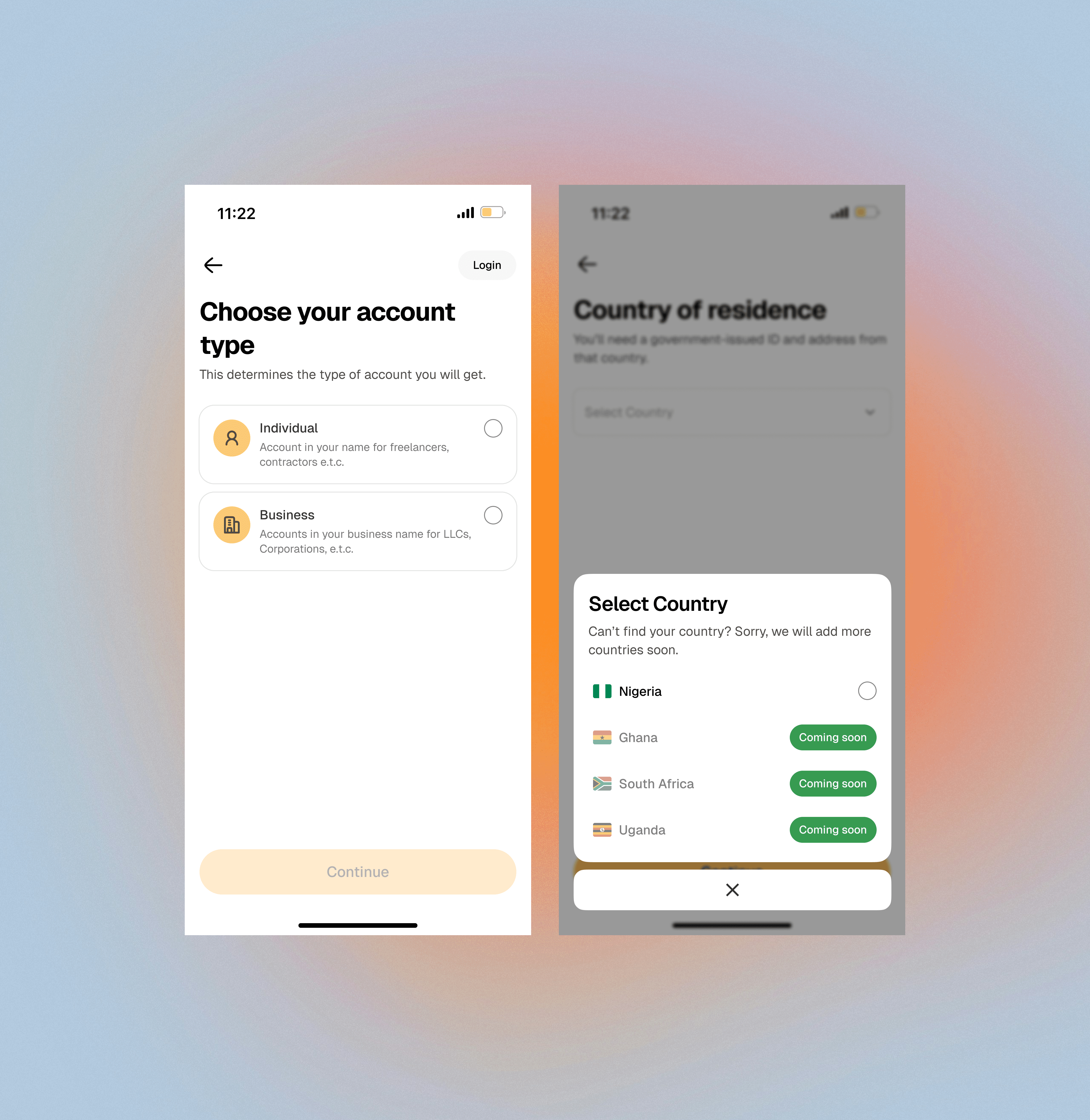
1. Making onboarding feel more focused
Getting started with a financial product already requires users to make several important decisions.
Instead of presenting too much information at once, I structured onboarding around focused steps.
Users first choose the type of account they want to open before selecting their country of residence and continuing through account setup.
Selection states clearly show the user's current choice, while the primary action remains unavailable until the required information has been provided.
The intention was to make every screen answer two simple questions:
What am I choosing?
What do I need to do next?
Giving the dashboard a clearer hierarchy:
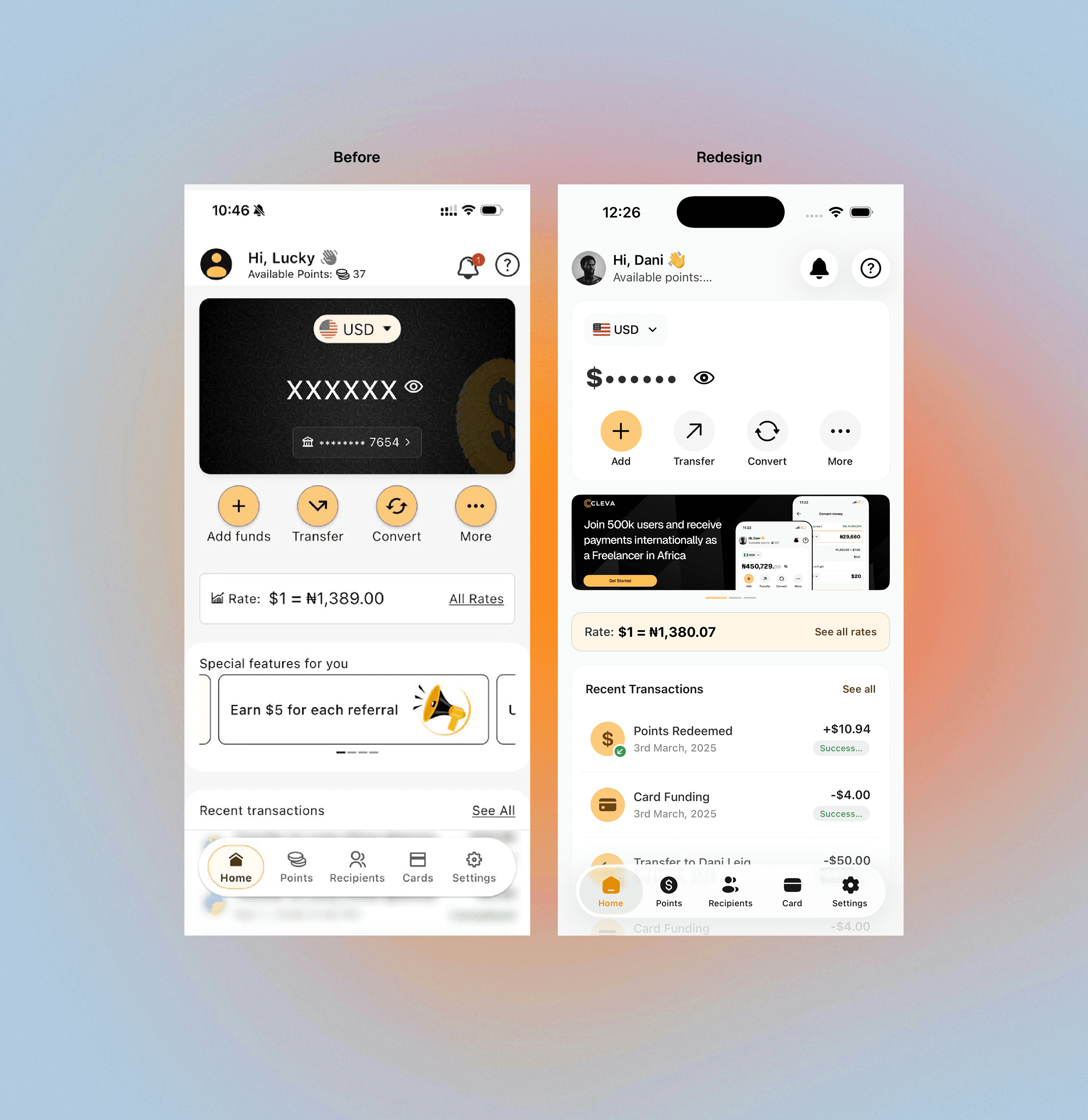
The dashboard is where several parts of Cleva meet.
Users need to understand how much money they have, access common actions, see relevant rates and keep track of recent activity.
In the existing experience, several sections competed for attention because they carried similar visual weight.
I reorganised the dashboard around three levels of priority.
Account status
The active wallet and available balance become the strongest information on the screen.
Primary actions
Actions such as adding money, transferring and converting sit directly beneath the balance so users can move from information to action quickly.
Supporting information
Exchange rates, announcements and recent transactions remain accessible without competing with the user's account information.
The result is a dashboard that gives users a clearer starting point every time they open the app.

Making multiple currencies easier to manage:
Cleva allows users to manage money across different currencies.
I wanted switching between them to feel like changing the context of the current account rather than navigating to an entirely different part of the app.
I introduced a wallet selector directly from the balance area.
Tapping the current currency opens a bottom sheet showing the user's available wallets and their respective balances.
Selecting another wallet immediately changes the active account being viewed.
This keeps users on the dashboard while making it easier to check and manage different balances.

Simplifying how users add money:
There can be several ways to fund an account, and presenting all of them within one long flow can quickly become difficult to understand.
I separated the funding experience by method.
Users first decide how they want to add money before seeing the information relevant to that method.
Bank transfer
Users can access the account details required to make a transfer without unrelated information competing for attention.

Stablecoin
Users choose the relevant network before receiving the wallet address and QR code needed to complete the deposit.
Important deposit information remains close to the address so users understand the conditions before sending funds.

Conversion
Existing balances can also be used as a funding source when users want to move value between currencies.
Separating these methods gives each flow enough space to communicate its requirements clearly.


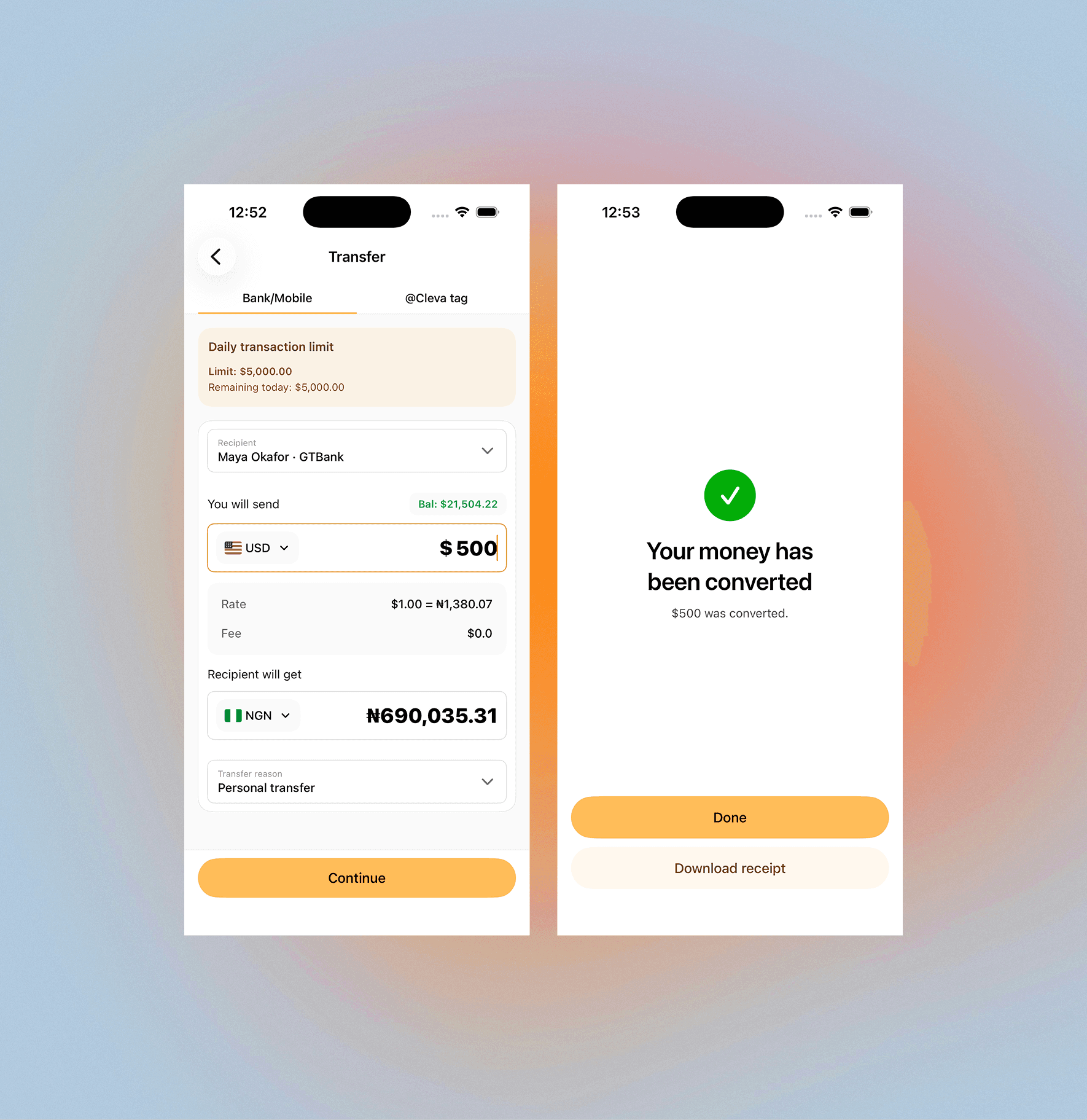
Converting money involves more than entering two numbers.
Users also need to understand which balance they are converting from, what they are receiving and the rate being applied.
I designed the conversion flow around those three pieces of information.
The source and destination currencies are visually separated, while the exchange relationship remains visible throughout the interaction.
The aim was to make the conversion feel predictable before the user confirms it.
Making the virtual card feel like a product users control:
The virtual card is more than another account balance.
Users need to see the card itself, understand its state and quickly access the controls associated with it.
I reorganised the screen around the virtual card as the primary object.
The card is followed by its most relevant actions, including:
・Top up
・Withdraw
・Freeze
・Reveal card details
Recent card transactions remain accessible further down the page.
This creates a clearer relationship between the card, the actions available to the user and the activity connected to it.

Making transaction information easier to scan:
Financial history can become difficult to understand when every transaction is presented with the same visual treatment.
I focused on making individual transactions easier to recognise through clearer grouping, transaction labels, amounts and statuses.
The goal was to help users understand what happened without needing to open every transaction for additional context.
Detailed views (See all) then provide the information required when users want to inspect a specific payment more closely.

Designing for clear confirmation:
Moving money requires confidence.
For actions such as adding funds or completing a transfer, users should never be left wondering whether something worked.
I used clear confirmation states at the end of important flows to communicate successful actions and provide an obvious path forward.
These moments are intentionally simple.
Once an action has been completed, the interface stops asking the user to make decisions and instead confirms the outcome.
Extending the experience to web:
The redesign also explored how Cleva's visual language could extend beyond the mobile product.
The website uses the same core principles as the app: clear hierarchy, focused messaging and strong presentation of the product itself.
Rather than filling the page with large amounts of copy, the design uses product screens and concise content to show what Cleva allows users to do.
This creates a stronger connection between the product being marketed and the experience users eventually interact with.


Building a more consistent system:
A major part of the redesign was creating consistency across screens.
Repeated elements such as cards, inputs, bottom sheets, navigation, transaction rows and selection states follow the same visual and interaction patterns throughout the product.
This reduces the number of new patterns users need to learn as they move between different tasks.
Consistency also makes the interface easier to extend as new functionality is introduced.

Before and after
The redesign did not try to change Cleva simply for the sake of making it different.
Instead, each change was centred around improving one of three things:
Hierarchy: Making the most important information easier to see.
Clarity: Helping users understand actions and financial states more quickly.
Consistency: Creating predictable patterns across the product.
The result is an interface that keeps Cleva's existing functionality while presenting it in a more focused and cohesive way.

Reflection
One of the biggest decisions in this project was knowing what not to redesign.
Because this was an independent concept without access to Cleva's internal analytics or product research, I avoided making large structural changes based purely on assumptions.
Instead, I worked within the product's established workflows and focused on areas I could evaluate directly through the interface: hierarchy, interaction consistency, information presentation and visual clarity.
If I were taking the project further, I would validate the redesign with people who regularly receive international payments.
I would specifically test:
・Onboarding comprehension
・Switching between currency wallets
・Choosing a funding method
・Understanding exchange rates during conversion
・Managing virtual cards
・Finding and interpreting past transactions
Those findings would determine where deeper changes to the product experience were actually necessary.